
Settings
Open Settings from the ⋯ button (Settings and more) at the top right.
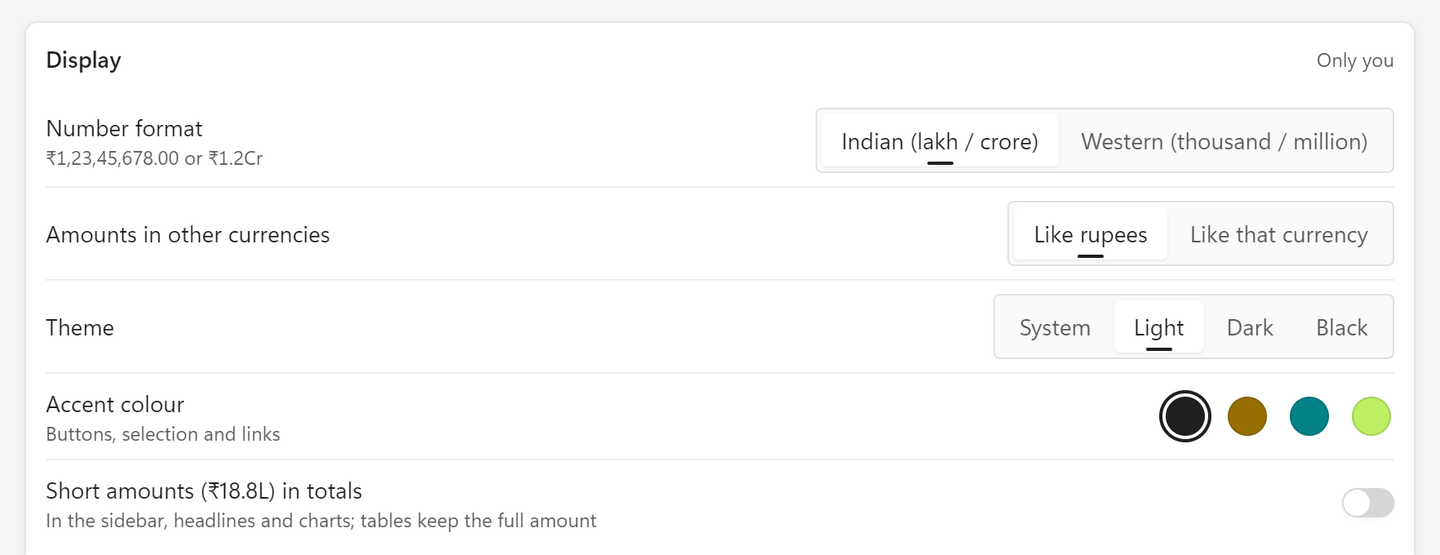
Display
These are yours only; other people on the same Miserly keep their own.
- Number format: Indian (lakh, crore) or Western (thousand, million).
- Amounts in other currencies: written like your totals’ currency, or the way that currency is usually written.
- Theme: System (follows your computer’s light or dark setting), Light, Dark or Black.
- Accent colour: the colour of buttons, selection and links (Ink, Gold, Teal, Lime, and on the Windows app your Windows accent colour).
- Short amounts in totals: shows totals such as ₹12.4 L in the left-hand list, headlines and charts. Tables keep the full amount.
Group
The group’s name, shown under your name in the left-hand list. Leave it blank for none. The admin also manages Members here: see People and sharing.
Currencies
Totals are in the currency you chose at setup; it can’t be changed in this version, nor can the month your year starts in. Both are shown here.
You can still keep an account in dollars, euros or another currency: pick the currency when you add it. Miserly converts it for your totals using a rate you set here, under Rates set by hand: click Set rate beside the currency. Until it has one, the account shows Rate needed and stays out of your totals. Click Edit to change the rate whenever you like. Only someone who holds an account in a currency can set its rate.
Import
Brings in Actual Budget’s export, and lists past imports with Undo import. See Coming from Actual.
Your data
On the Windows app: where your data file is, with Copy path and Open folder. See Your data.
Zoom and shortcuts
The ⋯ menu also has zoom controls (on the Windows app), Keyboard shortcuts and About Miserly, which shows your version.
AGPL-3.0. Built with AI assistance. © 2026 JAM Lab